

Turn your computer into a Wii U and play every game – Cemu complete install and setup tutorial
15th February 2026
Run your Wii U and vWii games from a single hard drive – Modded Wii U ISFShax setup
20th February 2026
Is Windows 11 dead, broken or spying? Cutting through the hype about Windows 11.
Since Windows 10 reached its end of support deadline in October 2025 there’s been a lot of talk about Windows 11 being dead, broken and spying on us. In this video I want to break through some of the hype so you’ve got a better idea of where we stand and if moving away from Windows is going to be right for you.
You Need A New Computer
So let’s start with the idea that killing Windows 10 is designed to force us to buy a new computer.
Windows versions 1 to 10 ran on any computer. If your computer wasn’t powerful enough it would just run slowly, if you had incompatible hardware you might struggle to find drivers, but it didn’t refuse to install. On Windows 11 there is a minimum set of hardware requirements. If you don’t meet them, the message is basically to scrap your computer and buy a new one.
The headline requirements that have made many fairly new computers obsolete are the TPM chip, supported processors and UEFI Secure Boot.
Windows 11 requires a TPM 2.0 module to be installed on your motherboard, the main circuit board in your computer. It helps increase the security of the computer. Whilst in a large company setting this is probably something the IT department would want, for the most of us it’s not going to make a big difference. It basically protects various digital keys inside your computer so that if it is stolen it will be harder for someone to get at your data. Most computers built after 2010 will have at least a TPM 1.2 chip installed with TPM 2.0 coming in around 2018. Both versions do a good job of protecting keys but the older chip will mean you can’t use Windows 11 simply because it’s older.
UEFI Secure boot is a part of the UEFI specification dating back to around 2012 so most machines still being used will have it. It replaced the old BIOS system and effectively locked the computer down so that it would only boot from authorised drives and run authorised software. Without it someone could walk up to your computer, pop in a USB drive, boot from that and then have access to your machine. This is definitely something worth having and most computers you’d be using for day to day work will be new enough to have the feature.
The big computer killer though is the minimum processor requirement. This seems to be a fairly randomly chosen value that instantly makes a whole range of computers that can easily run Windows 11 unable to install it. Microsoft set the bar at Intel 8th Generation processors, Ryzen 2000 Series and ARM Snapdragon 7 and 8 chips. The spec basically kills all machines before 2018. Whilst they may meet all the other requirements and be more than powerful enough to run the software they will simply be blocked.
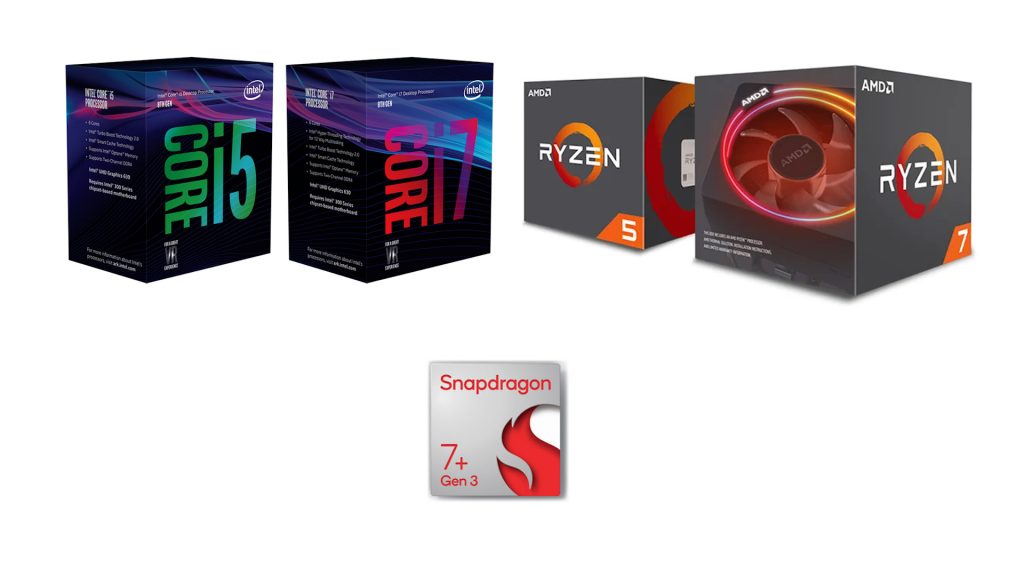
Of all the requirements this seemed to be the most controversial. With Windows 11 launching in late 2021 that meant that computers over 3 years old were being made obsolete. At the time some brand new PCs sitting on shelves were not compatible, but Microsoft held firm on the requirement. Except that is for their own Surface Studio 2 all in one PC with its 7th Gen Intel processor that got added as a rare exception. I guess they wanted to keep people who were still spending $4000 on their flagship PC happy.
Installing Windows on Old Hardware
Having said all of this Microsoft did create a hidden and very unofficial way to get around the requirements. I say unofficial, but the instructions are still clearly laid out on an official Microsoft help page, albeit with big warnings about not doing it and that they won’t guarantee compatibility later on. But I and may others have been running Windows 11 on unsupported hardware for years without issues. Indeed I made a video a while back that shows you how to install it.
Basically there is a switch in the software to turn off the checks. After that the OS runs fine, which sort of questions why the checks are there in the first place. Every Windows version before gave the user a choice to use any new security features. If you chose not to it was OK and your decision, but you were warned about the risks to cover Microsoft’s liability.
So in conclusion then, YES. Windows 11 is trying to get you to upgrade but if you have a little PC knowledge you can get around it. For business owners then yes again you’re being pushed, but I guess bypassing the checks and having your computers officially labelled as unsupported will have consequences for your insurance etc.
Is Windows Dead and Broken?
The current rumour mill is putting forward that Windows 11 is itself on the way out. A couple of versions have been retired such as Windows 11 SE, which I don’t think anyone used anyway, and some updates have been released for certain versions and not others. There have also been a few botched updates that have destroyed various parts of the operating system and some of its core applications suggesting that Microsoft might not be as committed to Windows 11 development.
Windows 12 is also being rumoured although there is no official information on it.
Again this is probably just the natural progression of the software. We’ve all seen the relentless march towards making everything AI powered and Windows is forging ahead with the full integration of CoPilot into everything whether you want it or not. Bugs in updates have always been a part of Windows, and many others to be fair, so it’s unlikely this is deliberate.
Windows 11 is over 4 years old but still receiving plenty of updates and upgrades. Eventually Windows 12 will come out in some form but again this will probably be a development of Windows 11 with the ability to upgrade, hopefully for free.
So I don’t see Windows 11 as being abandoned or necessarily broken beyond repair. Any bugs will get resolved or worked around as Microsoft really can’t afford to lose it’s hold on the PC market.
Spyware?
Which I guess brings us to the final concern I wanted to cover in this video. Spyware.
Windows 11 has made a shift towards more data collection. Whether this constitutes spying on us will come down to your personal feelings about it.
Previous versions of Windows allowed you to create something called local accounts. These allowed you to log onto your computer without adding any personal information, and these accounts did not connect to any centralised account system that would allow your activity to be monitored. Now Windows is forcing you to use a Microsoft Account to log into your computer. The idea is that this will allow you to easily use cloud based services such as OneDrive, Office 365, etc so that you can sync your work between devices.
If you’re like me you’re probably already doing this with multiple accounts. For example I run my Windows through my Microsoft account so I can use the cloud services, my browser is logged into my Google account. Amazon is logged in, Facebook, etc, etc. Each of these services will be tracking me at various points as I use my PC. Although this data collection is supposed to be anonymous it’s obviously not as it’s used to give personal customisation for advertising, recommendations, and everything else. Hopefully my actual name and personal details are not being shared outside of each platform as that would be a GDPR data crime, but I have no doubt that my activity is being tagged with some sort of unique identifier.
This issue is not restricted to Windows. If you’re an Apple user you’ll be very familiar with using your Apple ID for pretty much everything on every device. The only exception is Linux where by default all accounts are local to your computer so you are anonymous and have to actively want to connect to these sorts of services.
So does this amount to spying? Again this is going to be a personal answer.
Windows has taken the approach to default to tracking turned on. Pretty much all of it can be turned off if you know how. It’s not obvious but it can be disabled. The worrying part is that most of us aren’t aware just how much data is being collected.
When you start your computer and log in that data is collected. When you start an application that data is collected. When you visit a website, read an article, click a link all collected. AI is being hailed as the best thing ever, but again everything you ask it is being processed on centralised servers using your account details. Even Alexa who helps me remember things like appointments and how long my chicken has left to cook is obviously reporting back to her masters – it’s always strange how a dinner conversation seems to turn into Amazon recommended products to often for it to be a coincidence!
So is Windows 11 spying on us. Yes. But so is everything else.
Is it a problem? Possibly. That’s where your personal privacy limit will come into play.
Can you get around it? Yes. But some of the services you rely on will either not work or work less efficiently.
As usual it’s a trade off between being able to use the services for free or not. Again free being used here in the sense of no money being exchanged, just data.
What Next?
So I guess in summary Windows 11 isn’t broken or evil, it’s just evolving with the way in which we use our computers, the increasing need to protect our computers and how we give up our personal data and preferences in exchange for making our lives more connected to services and each other.
For me that fact that some of these compromises are being pushed rather than an active choice is a bit concerning. I’d be happier if we were actively told what was being done and why, and then given the choice to go along or being given an alternative. I guess most of these companies will say that’s what they do, it’s probably all in the small print, but they’re definitely not totally up front about it all.
Should you ditch Windows for something else?
It’s hard to think of what the alternative is. Apple’s MacOS is probably slightly less intrusive but you do have to buy into the whole Apple ecosystem. Linux is still putting you first, but in doing so it does rely on you knowing what you’re doing for quite a bit of the computer setup and operation as a lot of the applications you’re used to using aren’t available on the OS.
I’ll be continuing to use Windows 11 and will no doubt move on to Windows whatever when it comes out. Having gone through this post I will be looking at some of the privacy features and fine tuning those. But overall I think a move away from Windows would be too painful. At least for the moment.