

Turn your phone into a laptop or PC – Using a USBC dock to get HDMI and USB ports
11th November 2026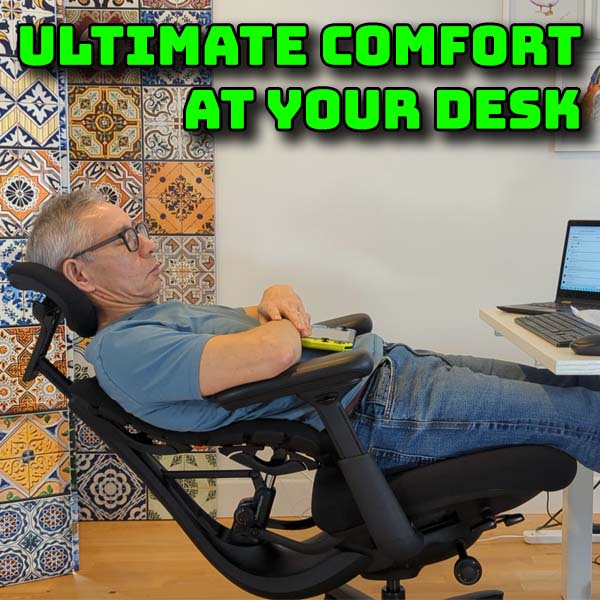
Ultimate Comfort for Long Hours at Your Desk? – LiberNovo Omni SE Review
If, like me, you work at a computer, chances are you spend a big part of your day sitting in an office chair. Whether you’re writing software, editing videos, working with spreadsheets or just dealing with emails, you can easily end up sitting at your desk for hour after hour.
Quite often we’ll spend a lot of time selecting the right computer, tuning its performance, making sure our monitor has the best resolution and refresh rate and all the other fun technical aspects of our work setup.
But what about the actual chair we’re sitting in for all that time?
This can make such a big difference to your comfort as you work, or play, but we often just make do with whatever comes to hand. I too fell into this trap with a standard swivel chair, not paying much attention to how it was going to support my body.
But luckily Libernovo asked me to take a look at their Omni SE chair and I’ve suddenly realised what I’ve been missing.
This is the LiberNovo Omni SE, an ergonomic office chair with a rather unusual approach to supporting your body while you’re sitting.
Rather than simply providing a padded seat and adjustable backrest, LiberNovo has developed a system that’s designed to move and adapt as you change position.
So today I want to take a closer look at how that system works, what adjustments are available, and most importantly, whether it actually makes a difference when you’re spending long periods working at a computer.
Just to be clear on this review, Libernovo have provided me with this chair and are sponsoring this video. But as usual all of my views and conclusions, both good and bad, are completely my own opinions.
Get Your Own Chair
Get up to 42% off at the Libernovo website during their Black Friday promotion.
LiberNovo Omni SE: https://uk.libernovo.com/pages/libernovo-omni-dynamic-ergonomic-chair?ref=BYTESNBITS
LiberNovo Black Friday: https://uk.libernovo.com/pages/black-friday-cyber-monday-sale?ref=BYTESNBITS
LiberNovo Amazon: https://amzn.to/3WOn9vt
Design, Construction and First Impressions
The first thing that strikes you about the Omni SE is that it doesn’t look quite like a conventional office chair. There’s a fairly elaborate mechanical structure behind the backrest, and the whole design has a slightly futuristic appearance.
But this isn’t simply for decoration.
It’s been really well engineered to allow different parts of the chair to move together as you change position which I’ll demonstrate in a second.
The seat and backrest use padded materials rather than the mesh construction found on many ergonomic office chairs. The seat uses three different densities of foam. Soft at the front to reduce leg pressure and harder at the rear to support your bones, all encased in a breathable material, designed to provide support while spreading your weight more comfortably.
The backrest uses a triple layer construction with a skin friendly fabric on top of a pressure relieving foam supported by the flexible, aerospace grade panels of the flexible backrest we’ll be looking at in detail later.
So the chair itself comes as a kit of parts in a rather large box. Mine also came with the optional footrest.
Assembling the chair was straightforward. The included instructions were very clear and all the tools and fixings were provided in the kit. Overall it took about half an hour to get it all put together.
The quality of construction is particularly important with an office chair as you’ll be spending a lot of time sitting on it.
The Libernovo did not disappoint on this front with all the parts fitting together very precisely with no play in any of the joints and with all the components being nicely overengineered for strength and wear resistance. This chair is going to last you a long time.
So with the unit ready for use let’s look at its features in more detail.
The Backrest – What’s Different?
Probably the most interesting feature of the Omni SE is its backrest design.
On a normal office chair, the backrest is usually a fixed shape. You might be able to adjust its height or angle or add some lumbar support, but its overall shape doesn’t change very much.
The Omni SE takes a different approach.
The Bionic FlexFit Backrest is made up of 8 flexible panels, each attached to the back framework structure with two pivoting joints and connected to their partners so that they move in unison. This basically creates an external spine like structure to match and support your back. The idea is that as you lean backwards or change your position, the chair automatically adjusts to maintain support against your back. And this is ideal for when you’re working at your computer.
We don’t always stay in the same position. We lean forwards to concentrate, sit back while reading, turn to another monitor or simply change position because we’ve been sitting still for too long.
And that’s perfectly normal.
So rather than trying to hold you in one fixed posture, the Omni SE is designed to accommodate these movements.
The backrest also uses an S curve adjustment knob that alters the overall shape of the backrest. You initially adjust this to fit the curvature of your back so that it’s fully supporting your body whilst sitting upright. Once that’s set the chair will then track your movements and keep the backrest in just the right position to continue giving you full support.
So, that’s the theory. But does it work? More typing in on the computer
Actually this works really well.
It’s one of the best arrangements I’ve used. As you lean forwards and backwards the Dynamic Support System keeps the backrest, headrest and arm rests perfectly in track with your body making sure that you always have a comfortable, fully supported sitting position, even when you fully recline. Quite a lot of chairs need you to shift your bum a bit when reclining to reposition the back and lumbar supports. But not this one.
All the individual parts of the chair are engineered to track your movements and keep the back, seat, armrests and neck support in the ideal position.
Adjusting the Chair for Your Working Position
So far so good.
Of course, even the most sophisticated backrest isn’t much use if the rest of the chair doesn’t fit you properly.
And one of the important things about choosing an office chair is being able to adjust it to suit both your body and your workstation. The Omni SE provides the usual seat height adjustment, allowing you to position yourself correctly relative to your desk. The adjustment gives a very good range of motion from low to high, more than available in quite a few other chairs I’ve tried.
Ideally, you want your feet comfortably supported, with your arms and shoulders in a relaxed position while you’re using your keyboard and mouse.
The armrests are adjustable in several directions. You can change their height, move them forwards and backwards, alter their width and rotate them.
This is particularly useful if you spend a lot of time typing. You want your arms to be comfortably supported without having to raise your shoulders or reach awkwardly forwards.
And if you’re moving between keyboard work, mouse use and perhaps writing or reading documents, you may find that slightly different positions work better.
The chair also has a fully adjustable neck support.
This lets you place a lovely, soft pillow right where you need it to support your neck and head.
Whilst sitting upright, in the correct sitting posture, which is very helpfully detailed in the instruction manual, you can adjust the height, depth and angle of the headrest. It really helps keep your back in the right position for maximum comfort. But of course it comes into its own when you start to recline.
Reclining – Not Just for Relaxing
The chair offers five recline positions, from 105 degrees to a maximum of 160 degrees. You set this recline angle using a twist know at the right hand side of the chair. This lets the chair back move between upright and the set maximum recline angle so you can start from an upright seating position and then recline back to a set position.
There’s a spring tension adjustment knob on the side of the chair so you can set the resistance of the backrest as you recline.
Now, at first glance, being able to recline almost horizontally might seem a little unnecessary for an office chair. But there are some practical benefits to being able to change your sitting position throughout the day.
For example, when I’m programming or editing, I’ll generally be sitting in the upright position, concentrating on the screen and using the keyboard and mouse. Libernovo refer to this as Deep Focus mode. Recline to the first position and I’m slightly more relaxed but still able to operate my computer with ease.
If I’m reading through documentation, watching a tutorial or simply thinking through a problem, I might prefer to lean back a little more.
And if you’re spending a long day at your desk, having the option to change position can be quite welcome.
At the maximum 160-degree setting, you’re almost lying down. In this position you’re effectively lying on a very comfortable bed with that active backrest doing a great job of supporting your spine. Perfect for a break from work without having to move to a different location. And with the footrest you get whole body support for a short nap!
Overall impressions
So that’s the Libernovo Omni SE chair.
Overall I’m very impressed with this piece of kit.
My main take away is how much more comfortable a well designed chair is than my standard office chair.
The foam padding with its different firmness zones is really soft yet very supportive. The backrest and the way it moves has to be about the best I’ve tried out. I do suffer from lower back pain if I sit in the wrong position for too long. But having used this chair for a week or so, and for some long days of coding, I’ve not had any soreness or stiffness.
The flexibility in seating position and the full support you get as you move around really does make a difference.
The basic chair design is also available in a few other models.
The Omni Pro adds a motorised backrest adjustment and an airflow system in the seat to keep you cool and fresh. The backrest will also give you a gentle spinal stretch when you fully recline.
The Maxis is for people with a bigger build to make sure that you can find the seat that perfectly fits our frame.
But ultimately, I think the value of a chair like this comes down to how much time you spend sitting at your desk, how well it fits your body and whether the additional comfort justifies the price.
If you spend most of your working day at a computer, whether you’re programming, editing videos or just dealing with everyday office work, I think your chair is something that’s well worth investing in.
After all, it’s probably one of the most frequently used pieces of equipment in your office.
As usual I’ll put some links in the video description so you can get hold of one of these chairs for yourself. At the moment in November 2026 Libernovo is having its Black Friday sale so make sure you check out their website for some fantastic offers.
Let me know in the comments what chair you’re currently using, and whether you’ve found a particular ergonomic feature that makes a real difference during long working days.