
How to upgrade your Nintendo Switch CFW and OFW – Hekate, Atmosphere and OFW
19th April 2026
SD cards explained – what do the numbers mean – what’s the best one for you?
1st May 2026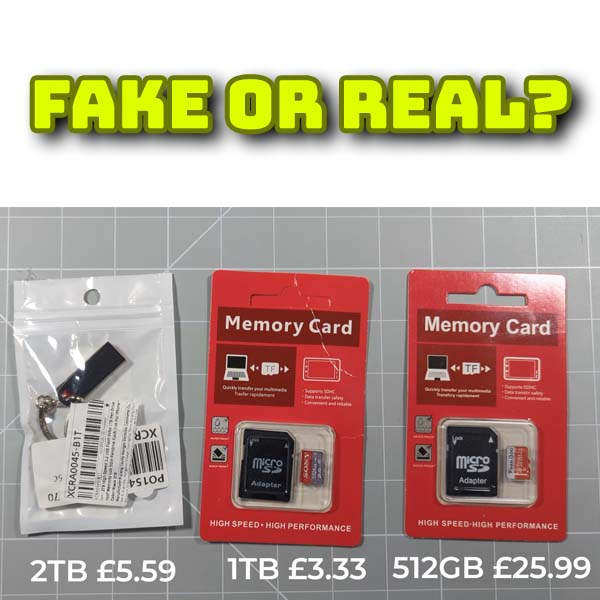
Fake SD Cards and USB drives – What they are and how to spot them
With current storage prices we’re all looking for the best deals on SD cards and USB memory sticks. Recently I needed a 512GB SD card for a newly modded Nintendo Switch and looking on Amazon a quality branded device was coming in at around £80 to £100.
But changing the product sort order to lowest price first brought up what looked like a great deal. A 512GB SD card for a quarter the price of the named brands? That had to be worth a go.
The card I chose at the time was priced at £25 which could just be a very cheap non branded card. It had around 50 glowing reviews and was being sold through Amazon Prime on next day delivery so everything sounded in order. So I bought one!
I also had a look on Aliexpress and Temu where you can get large capacity memory sticks and SD cards for as little as £3 to £5. These are obviously fake but I thought let’s give them a try and see how they compare to the Amazon deal.
A couple of weeks later I now have a 2TB USB drive for £5.59, a 1TB SD card for £3.33 and a, fingers crossed please let it be real, 512GB SD card for £25.
So let’s get testing.
Initial Device Checks
To begin with we can check the devices with just our standard Windows, MacOS or Linux tools.
If I pop the USB drive into my Windows PC it will open up in my File Explorer and if we look at the drive properties we’ve got a full 2TB of storage space. Great!
It’s formatted as FAT32 so let’s change that by reformatting the drive. I’ll set it to exFAT so we can use larger file sizes and that all runs through fine. Let’s try copying some files to the card. Some images and a couple of videos. That all copies over fine so let’s test them to see if they work. And that all checks out as well.
So on the face of it, it looks like we’ve just bagged a fantastic bargain.
Similarly with the 1TB SD card and my 512GB Amazon find we get exactly the same results.
So did I really get 3.5TB of extra storage space for less than the cost of an overpriced branded 256GB card?
What are Fake SD Cards
The cards and memory stick all work, I put multiple files on there, so what can be wrong?
Memory devices work by having memory storage ICs inside them that are connected to a controller chip. This controller chip handles communication with your computer, phone, camera etc. receiving data to store in the memory ICs and pulling data out of those memory devices to send back to your machine.
Your computer doesn’t actually have any direct connection to the memory chips. Everything it knows about the SD card or memory stick is provided by the memory controller device. If that controller happened to be lying about how much memory was really built into the card then your computer would not know the difference and report back to you that everything is fine.
There has got to be some sort of memory on the card as the files all worked, but the trick they use is to only add enough to make it look like the card is working. When you start using a memory card you tend to store at most a few gigabytes worth of data.
So what if they put say 32GB of memory onto the card. You would be able to use the card. Even if you were using it as a hard drive for your Raspberry Pi, extra storage for your phone or as a drive in a games console. You could add files and fill up the 32GB of space.
The problem comes when you get to the end of the real 32GB of storage.
The controller chip knows there’s only 32GB, but it’s telling your computer that there is say 512GB. So your computer thinks there is 480GB of space left and keeps sending new files to the card.
The card memory controller has to accept the data but what to do with it?
With only 32GB of real space it fills that up first. When you try to save the 33rd GB of data it simply rolls round and starts filling from the beginning. So new files start to overwrite the old files. When it gets to 64GB it just repeats to process again.
The idea here is that you will only notice the card isn’t working when you need some of the older files. They just won’t be there any longer, or will be partly overwritten and show as corrupted.
This is why these cards can be so dangerous. Your computer can’t see that your new files are overwriting the old ones. If you don’t notice it and add tens of gigabytes of data, when you come to retrieve those files they just won’t be there. They will be lost forever and not recoverable.
Testing for Fake Cards and Memory Sticks
How do we test for fake memory devices?
Luckily there are some handy applications that will detect these fakes. Most of them work in the same way on whatever flavour of computer you’re using. These applications will destroy data on the drive so please do not run them if you’ve already saved data on the drive. Make sure you back up everything you can first.
The only way to detect this memory roll round is to add files to the device and see if they can still be accessed. Remember any queries you send to the fake device will be answered by the memory controller chip but that has been programmed to lie.
I’m using a Windows PC so the main application to use is H2TestW. If you’re using Mac or Linux try F3 – Fight Flash Fraud.
https://github.com/AltraMayor/f3
For H2TestW just go to this website.
Scroll down to the table of contents and click the Download link. This will take you further down the page to the actual download button.
Click and save the zip file to your computer. Then simply extract the files from the archive into their own folder and you should then have the h2testw .exe file. Double click that to run the application and you should get this wndow pop up.
The code was written by a German developer so defaults to German text but just select English if that works better for you.
All we need to do is attach the SD card or USB drive we want to test to our computer and then select that as the target drive.
In the data volume box we need to specify how much data we want to put onto the drive to test it. If you select the all available space option the software is going to completely fill the card with 1GB generated files. For 512GB this will take around 6 hours depending on the drive speed. But we know that there’s unlikely to be that much real capacity in the device. So we can use a smaller test. I would advise testing for at least 70GB of data or 70000 MB. This will take just under an hour to complete but should catch most fake cards. I choose 70 rather than 64 as I want to make sure that if they have put in a 64GB memory device I am certain to over fill it. What we want to avoid is choosing too small a number so that we never get to the overflow situation and our test reports back the card is real even though it’s a fake.
So let’s test my ‘hope it’s real’ 512GB SD card.
When we start the test you’ll get a warning sating that we’re not checking the full data space. Just accept this and run the test.
The application starts by writing seventy 1GB files to the SD card. As you can see this all goes fine and the card reports no errors.
The test will come as the software tries to read and check the files.
As you can see the drive only managed to store just 58GB of data before it rolled round and started overwriting the earlier files. So this SD card has only got what would be classed as 64GB of data storage space.
If I repeat the test for the obviously fake drives you can see that they come up as 32GB of real data storage.
One note here is that these companies are knowingly trying to fool you. The 512GB card was being sold at a slightly higher price with a larger real storage capacity. If you still have doubts after running a 70GB test I would then rerun the test with the full data space. You can just leave the test running overnight. This will verify the card is truly real, but also report back on any data retention errors in case they’ve used low quality or faulty memory chips to get the cost down.
The Results
So hopefully this has shown you how the fake card system works and how you can check any device you buy. Unfortunately you do have to buy the device first to be able to check it.
For this video I purposely chose some obvious fakes and one possible fake.
As you saw the obvious ones tried to get away with as little real memory as they could. That memory is also likely to be faulty chips rejected by the manufacturers and basically sold as scrap.
The possibly fake card tried to put a slightly larger amount of working flash memory onto the card to help deceive us and I guess that’s partly why the cost was just at that ‘could it be a real deal’ level.
We all know that the sorts of deals I looked at were bound to be too good to be true. If you want reliable memory devices stick to the known brands. Having said that there are a lot more reliable brands on the market these days and you can still find bargains from time to time. For example this 512GB SanDisk card was on sale when making this video. At £50 it’s a slightly slower speed rating, but being sold directly from the SanDisk store you’re almost guaranteed a good quality, real device.